
Catalog Visibility
Table of Contents
1. Introduction
The Orangecat Visibility module (Catalog Visibility) for Magento 2 provides strict access control over your B2B storefront. It allows merchants to hide prices, hide the "Add to Cart" button, or completely force guest users to log in before they can interact with the store's catalog.
This manual covers the configuration settings and how visibility rules apply to anonymous users.
2. Configuration
The module settings can be found in the Magento Admin under Stores > Configuration > Orangecat > Visibility.
Administrators can define global rules on how guest users interact with the store:
- Force Login: If enabled, guest users are redirected to the Login page before they can see any content. This setting takes precedence over other visibility restrictions.
- Target URL: Defines the specific redirection path (e.g.,
/customer/account/login/). - Hide Price For Guest: Masks prices across the catalog if "Force Login" is disabled.
- Hide Add to Cart Button: Prevents purchasing by hiding all Cart actions for guests.
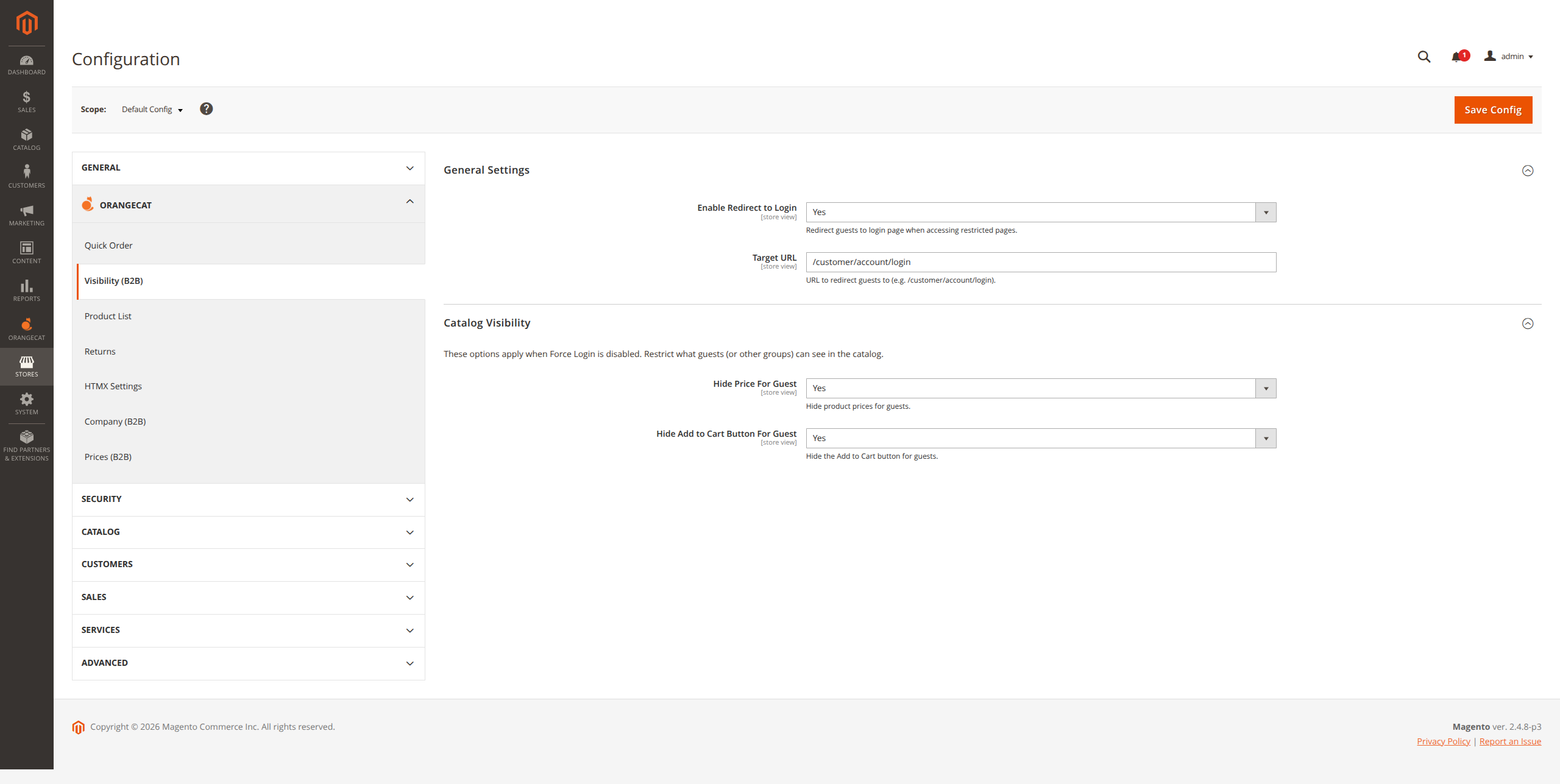
Figure 2.1: Global Visibility Configuration Settings
3. Frontend Workflow
Visibility restrictions are enforced on the frontend depending on the guest's authentication status and the backend configuration.
3.1. Force Login
When the Force Login restriction is active, any anonymous user attempting to view restricted pages (like Product Detail Pages or Category views) will be instantly redirected to the login gate.
3.2. Hide Prices
If purchasing is restricted but browsing is allowed, the Hide Price For Guest feature will suppress all price renderings, price boxes, and meta-tags on both Product List Pages (PLP) and Product Detail Pages (PDP).
3.3. Prevent Purchasing
To use the store purely as a catalog for guests, the Hide Add to Cart Button completely removes purchasing capabilities and restricts access to the minicart for all unauthenticated users.